The nano banana 2.1 api is the Gemini API, the model id is gemini-nano-banana-2.1, and an image costs $0.0336 at 1K, $0.0504 at 2K and $0.0756 at 4K, with batch mode 50 percent off. It has been generally available since 2026-10-06, so there is no waitlist and no preview flag. One POST to the generateContent endpoint returns the image as base64 in the response.
This page is the practical version: a request you can paste into a terminal, the same request in Python, an editing example, the full parameter list, what the API does not support, the migration off gemini-3.1-flash-image before it shuts down on 2026-10-29, and what a thousand images actually costs. Parameter names move between Gemini API versions, so check anything surprising against Google's current Gemini API documentation rather than against this page.
A note on what this site is: nanobanana21.app is an independent image generator and editor, not affiliated with Google, and it does not offer a public API of its own. If you want images and not code, pick Nano Banana 2.1 in the generator and skip everything below.
Nano banana 2.1 api: model id, endpoint and status
The facts you came for:
- Model id: gemini-nano-banana-2.1. This is the string you put in the request path or the SDK's model argument.
- API: the Gemini API, on the generativelanguage.googleapis.com host, through the generateContent method under the v1beta path. Check parameter names against Google's current Gemini API documentation before you ship, since they can change.
- Auth: an API key in the x-goog-api-key header, or whatever your SDK does with the key from its environment.
- Status: released and generally available since 2026-10-06, in the Flash tier, as an update to Nano Banana 2 (gemini-3.1-flash-image).
- Output: images come back inline in the response as base64, under the inlineData part, not as a URL you fetch later. There is no job id to poll.
- Every output carries a SynthID watermark. That is not optional and there is no parameter to turn it off.
Two things this is not. It is not an asynchronous queue: the request returns the image, so your timeout matters more than your polling logic, especially at 4K. And it is not a separate product from Gemini text: the same generateContent shape, with responseModalities set to IMAGE.
Price per image, and what real volumes cost
List price is per image and depends only on the output size you ask for:
Batch mode halves every number in the table. Batch is the right choice for anything that can wait: catalog renders, backfills, nightly jobs. It is the wrong choice for anything a user is sitting in front of.
Worked out at volumes people actually run:
- 1,000 images at 1K: $33.60 at list, $16.80 in batch mode.
- 1,000 images at 2K: $50.40 at list, $25.20 in batch mode.
- 1,000 images at 4K: $75.60 at list, $37.80 in batch mode.
- 10,000 images at 1K: $336 at list, $168 in batch mode.
- 100 images at 4K: $7.56 at list, $3.78 in batch mode.
Useful comparison for anyone budgeting a migration: Nano Banana 2 cost $0.067 per image at 1K, so 2.1 is roughly half, and 2K on 2.1 ($0.0504) is cheaper than 1K on the model it replaces. Prompt tokens are billed by the Gemini API's usual text rules on top of the per-image price; for ordinary image prompts that is a rounding error next to the image itself.
| Image size | List price per image | Batch mode |
|---|---|---|
| 1K | $0.0336 | $0.0168 |
| 2K | $0.0504 | $0.0252 |
| 4K | $0.0756 | $0.0378 |
A first request: curl, then Python
The REST call is one POST. Set GEMINI_API_KEY to your key, then:
The image arrives base64-encoded at candidates[0].content.parts[].inlineData.data. The jq line above picks the first part that has inlineData and decodes it, which is all the response handling most scripts need. Note that parts is a list and can also contain a text part, so select on inlineData rather than indexing blindly.
The same request with the google-genai Python SDK, which handles the endpoint and the key for you:
Three details that save an hour. responseModalities must include IMAGE or you get text describing an image instead of an image. imageSize takes 1K, 2K or 4K, and there is no 512 option. And aspectRatio is a string like 16:9, not a pair of pixel dimensions, so you choose a shape and the model picks the pixels.
curl -s -X POST \
  "https://generativelanguage.googleapis.com/v1beta/models/gemini-nano-banana-2.1:generateContent" \
  -H "x-goog-api-key: $GEMINI_API_KEY" \
  -H "Content-Type: application/json" \
  -d '{
    "contents": [
      {
        "parts": [
          { "text": "A wide product banner for a matte black insulated water bottle on pale concrete, soft window light from the left, the words STAY FULL in bold uppercase sans on the right third" }
        ]
      }
    ],
    "generationConfig": {
      "responseModalities": ["IMAGE"],
      "imageConfig": { "aspectRatio": "16:9", "imageSize": "2K" }
    }
  }' \
  | jq -r '.candidates[0].content.parts[] | select(.inlineData) | .inlineData.data' \
| base64 --decode > banner.pngfrom google import genai
from google.genai import types
# pip install google-genai ; the client reads GEMINI_API_KEY from the environment
client = genai.Client()
prompt = (
"A wide product banner for a matte black insulated water bottle on pale concrete, "
"soft window light from the left, the words STAY FULL in bold uppercase sans "
"on the right third"
)
response = client.models.generate_content(
model="gemini-nano-banana-2.1",
contents=[prompt],
config=types.GenerateContentConfig(
response_modalities=["IMAGE"],
image_config=types.ImageConfig(aspect_ratio="16:9", image_size="2K"),
),
)
for part in response.candidates[0].content.parts:
if part.inline_data:
with open("banner.png", "wb") as f:
f.write(part.inline_data.data)Editing an image: send the image, name the region
Editing is the same method with one more part in contents: the input image, then the instruction. There is no separate edit endpoint and no mask file to upload; you describe the region in words and the model confines the change to it.
The instruction is doing most of the work, and the pattern that works is: name the region, name the change, then name what must not move. An edit instruction without a keep-list invites a redraw of the whole frame. Regional editing is one of the three gains Google highlights in 2.1, so this is the request type that improved most over Nano Banana 2.
For multi-image work, keep adding image parts: up to 14 reference images in one request, up to 10 objects and up to 4 characters. Say in the text which attachment is the character and which are the products, because the model will not guess your intent from the order alone.
from google import genai
from google.genai import types

client = genai.Client()

with open("street.jpg", "rb") as f:
    source = f.read()

instruction = (
    "Change only the sky above the roofline to an overcast gray with soft diffused light. "
    "Keep the building, the street, the people and their shadows exactly as they are, "
    "and match the new light temperature on the rooftop edges only."
)

response = client.models.generate_content(
    model="gemini-nano-banana-2.1",
    contents=[
        types.Part.from_bytes(data=source, mime_type="image/jpeg"),
        instruction,
    ],
    config=types.GenerateContentConfig(
        response_modalities=["IMAGE"],
        image_config=types.ImageConfig(image_size="2K"),
    ),
)

for part in response.candidates[0].content.parts:
    if part.inline_data:
        with open("street-edited.png", "wb") as f:
            f.write(part.inline_data.data)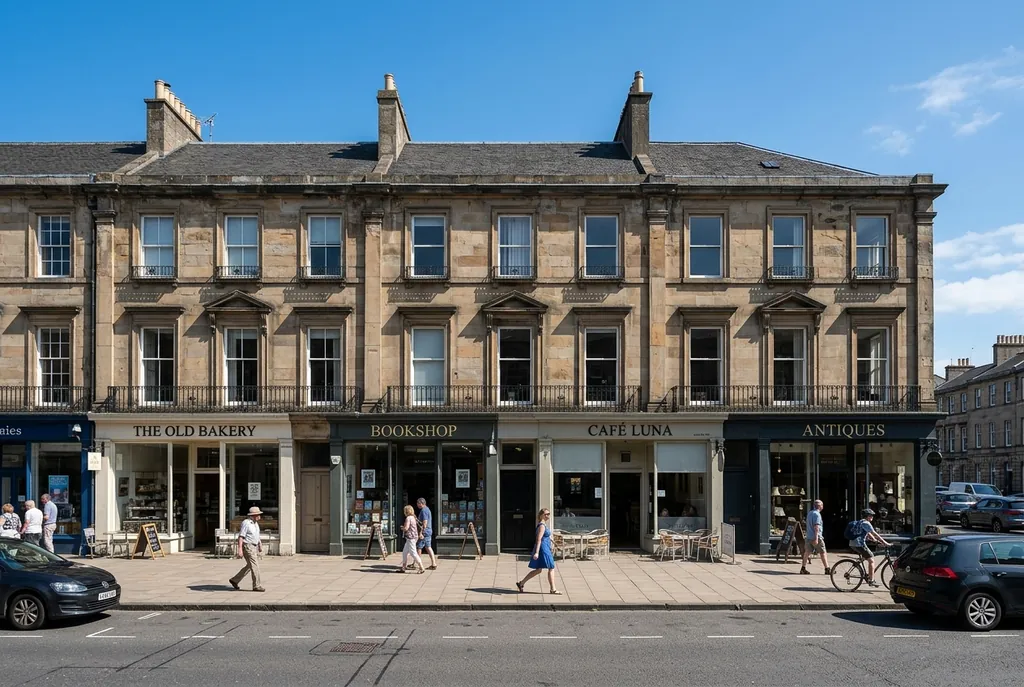
Input image
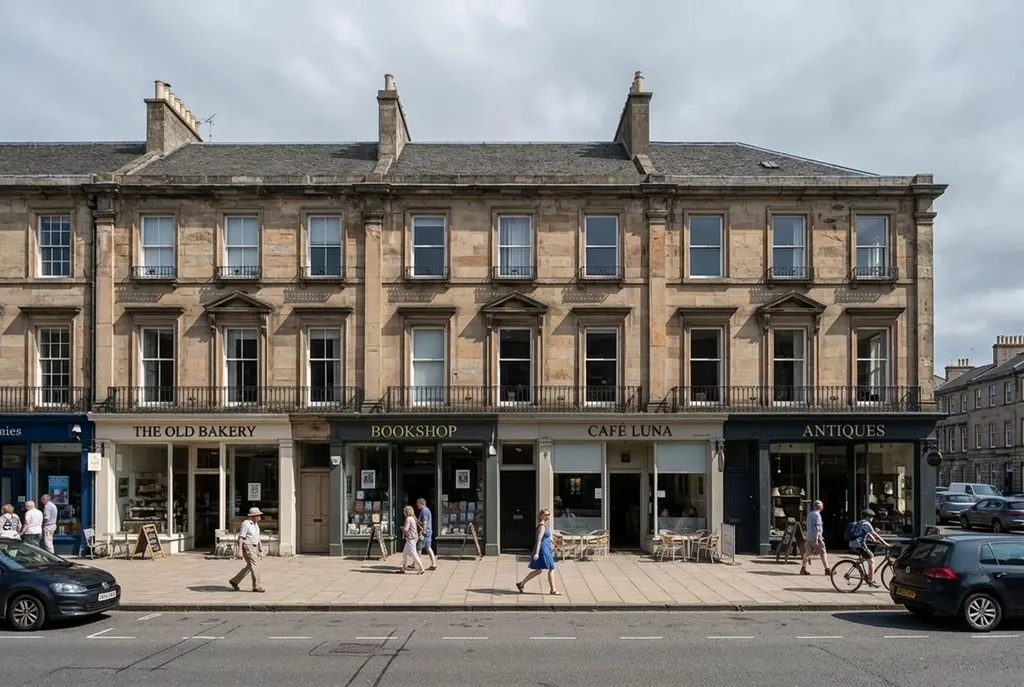
Result
Parameters you can set
What 2.1 exposes, as published on 2026-10-06. Names are the ones used in the samples above; check them against Google's current Gemini API documentation before you ship, because this is the part of an API that gets renamed.
- Aspect ratio. The standard list is 1:1, 3:2, 2:3, 3:4, 4:3, 4:5, 5:4, 9:16, 16:9 and 21:9. On top of that, the panoramic and extreme ratios 1:4, 4:1, 1:8 and 8:1 are available at 2K and 4K, in one pass, which is what removes the seams you used to get from stitching.
- Image size: 1K, 2K or 4K. There is no 512 pixel option; Nano Banana 2 had one and 2.1 dropped it.
- Thinking level: minimal, medium or high, with medium the default. High is for prompts with many conditions; minimal is for simple, high-volume generation. Leaving it alone is a reasonable choice.
- Reference images: up to 14 in one request, up to 10 objects and up to 4 characters, passed as image parts in contents.
- Google Search grounding, including Google Image Search, so a prompt about a real place, landmark or product category can be grounded in pictures rather than text alone.
- Response modalities: IMAGE. This is the switch that makes the model return an image instead of a description of one.
- SynthID: applied to every output. Not a parameter, just a fact.
A habit that maps onto the price table: draft at 1K to find the composition, then re-render the keeper at 2K or 4K. At $0.0336 a draft, exploring is cheap and finals are the only thing you pay real money for.

8:1 panorama
What the nano banana 2.1 api does not support
This is the list that saves you from designing around a feature that is not there. As published for 2.1:
- Function calling. Not supported, so the model cannot call your tools mid-generation.
- Context caching. Not supported, so there is no cached-prefix discount to engineer for.
- Structured outputs. Not supported. You are getting an image part and possibly a text part, not a JSON schema you defined.
- Live API. Not supported, so no streaming bidirectional session around image generation.
Two more boundaries that are not on that list but catch people out. There is no mask file upload: mask-based editing is driven by your description of the region, not by a PNG alpha channel you provide. And there is no 512 pixel output, so any pipeline that asked Nano Banana 2 for 512 has to move up to 1K.
What is supported is the thing that matters: image generation and image editing with references, grounding, ratio and size control, and thinking levels, through one synchronous generateContent call.
Migrating from gemini-3.1-flash-image
Nano Banana 2 (gemini-3.1-flash-image) is deprecated and shuts down on 2026-10-29. Google tells developers to move to gemini-nano-banana-2.1. The request shape does not change, so this is a short job if you do it deliberately:
- Grep for the old id and replace it, including in tests, fixtures, config rows and any cron script or worker you forgot about.
- Move every 512 pixel request to 1K, since that tier is gone.
- Keep your aspect ratios as they are; the standard list carries over. If you were tiling panoramas by hand, delete that code and ask for 1:4, 4:1, 1:8 or 8:1 at 2K or 4K.
- Re-run a representative set of prompts with only the model id changed, so a difference you see is the model and not your own new settings.
- Update your cost model: $0.0336 instead of $0.067 at 1K, and batch mode available at half of that.
- Make sure a scheduled job cannot sit on the old id past 2026-10-29. After the shutdown those requests fail, they do not fall back.
The longer version of this, with the spec differences laid out row by row, is in the Nano Banana 2.1 vs Nano Banana 2 guide.
Keys, limits, and what is not published yet
Getting a key is the standard Gemini API flow: a Google account, a project, a key, and billing enabled if you want more than whatever free tier your account has. Google AI Studio is the quickest place to try prompts and parameters against the real model before you write any code, and the request it shows you is the same generateContent call as above.
What Google has not published as of 2026-10-06:
- Rate limits and per-plan quotas for gemini-nano-banana-2.1. Not published yet, so build retry and backoff on the errors you actually get rather than on a number from a blog post.
- The country list for the consumer surfaces, and their per-plan image limits.
- Any independent benchmark of 2.1. The quality claims are Google's own.
Operational advice that does not depend on unpublished numbers: treat the call as synchronous and slow (4K takes the longest), set a generous client timeout, never retry a request that may already have been billed without checking whether it returned, log the response's token usage if you care about the text side of the bill, and keep the model id in configuration rather than in code so the next deprecation is a value change.
Keep API keys server side. The call needs a secret in a header, so an image generator in a browser that talks straight to Google is a key you have given away.
If you want images without writing code
nanobanana21.app does not offer its own public API. What it offers is the other half of this: a web generator and editor where Nano Banana 2.1 is the default entry in the model picker, with Nano Banana Pro, Nano Banana 2, Nano Banana 2 Lite and the original Nano Banana alongside it.
That is the better route when you want pictures rather than a pipeline: no key, no base64 handling, aspect ratios from 1:1 through 21:9, output at 1K, 2K or 4K, reference images for consistency, credits pay as you go with credit packs or monthly plans, automatic refunds on failed generations, and a library private to your account. New accounts get 20 free credits valid for 7 days.
For prompt structure that works the same whether you are typing into a box or a JSON body, see the prompts guide. For what the model is and where else it runs, what is Nano Banana 2.1.
FAQ
What is the Nano Banana 2.1 API model id?
gemini-nano-banana-2.1, used with the Gemini API's generateContent method. It has been generally available since 2026-10-06, with no preview flag and no waitlist.
How much does the Nano Banana 2.1 API cost?
Per output image: $0.0336 at 1K, $0.0504 at 2K and $0.0756 at 4K. Batch mode is 50 percent off, so 1K drops to $0.0168. A thousand 1K images cost $33.60, or $16.80 batched.
How do I generate an image with one request?
POST to the generateContent method for gemini-nano-banana-2.1 with your prompt in contents and generationConfig.responseModalities set to IMAGE, plus imageConfig for aspectRatio and imageSize. The image comes back base64 at candidates[0].content.parts[].inlineData.data.
Which parameters can I set?
Aspect ratio (1:1 through 21:9, plus 1:4, 4:1, 1:8 and 8:1 at 2K and 4K), image size (1K, 2K, 4K), thinking level (minimal, medium, high), up to 14 reference images, and Google Search grounding including Image Search. Check the exact names in Google's current Gemini API documentation.
What does the API not support?
Function calling, context caching, structured outputs and the Live API are not supported for this model. There is also no mask file upload (you name the region in text) and no 512 pixel output size.
How do I edit an image through the API?
Send the image as a part in contents followed by an instruction that names the region to change and what must stay the same. Same method, same model id, no separate edit endpoint.
What are the rate limits?
Not published yet as of 2026-10-06, for either the API or the consumer plans. Build backoff around the errors you observe rather than around a number you read somewhere.
Do I need to migrate from gemini-3.1-flash-image?
Yes. Nano Banana 2 is deprecated and shuts down on 2026-10-29. Swap the model id, move any 512 pixel requests to 1K, re-test your prompts with nothing else changed, and update your cost estimates.
Is every generated image watermarked?
Yes. Outputs carry a SynthID watermark and there is no parameter to disable it.
Does nanobanana21.app have an API?
No. This site is a web generator and editor with no public API of its own. If you want images without code, pick Nano Banana 2.1 in the generator here; if you want to build something, use the Gemini API directly.
Is this an official Google API reference?
No. nanobanana21.app is an independent site, not affiliated with, endorsed by or sponsored by Google. Treat Google's own Gemini API documentation as the authority on parameter names and limits.